Windows 分析调试工具
目的
本文提供 Windows 下调试定位 TDengine TSDB 崩溃问题指引手册,以下内容提供了两种分析方法。
dmp 文件
查找 dmp 文件
taosd.exe 进程在崩溃发生时,会捕获崩溃,并在其所在目录下生成 .dmp 文件,文件名以 taosd 开头,中间为崩溃时间,如taosd_20260509_124419.dmp,大小一般在 10M~200M 之间。
注意: 若有
dmp文件大小为 0K,可能存在严重堆栈被破坏情况。
无法生成 dmp 文件
若上一步中未生成 dmp,可能崩溃无法从进程内捕获,需启动进程外捕获 dmp。
把以下内容保存为 .reg 文件,双击 .reg 导入至注册表中,开启进程外捕获 dmp:
Windows Registry Editor Version 5.00

; Enable WER out-of-process dump for taosd.exe
; Dumps are written by WerFault.exe (a separate process) and are therefore
; immune to stack/heap corruption in taosd.
;
; Usage:
;   1. Double-click this file, or run:
;        reg import wer_localdumps.reg
;   2. Make sure C:\TDengine\core\ exists and is writable by NETWORK SERVICE.

[HKEY_LOCAL_MACHINE\SOFTWARE\Microsoft\Windows\Windows Error Reporting\LocalDumps\taosd.exe]
; Directory where WerFault.exe writes the .dmp files (must exist before crash)
"DumpFolder"="C:\\TDengine\\core\\"
; DumpType 2 = MiniDumpWithFullMemory (full user-mode dump, best for debugging)
"DumpType"=dword:00000002
; Keep at most 10 dumps (oldest is deleted when limit is exceeded)
"DumpCount"=dword:0000000a

; Suppress the "taosd.exe has stopped working" dialog on server environments.
[HKEY_LOCAL_MACHINE\SOFTWARE\Microsoft\Windows\Windows Error Reporting]
"DontShowUI"=dword:00000001
配置项说明:
- DumpCount:生成 dmp 文件数上限,超过后会删除最旧的 dmp 文件。
- DumpFolder:存放 dmp 文件的目录。
手动生成 dmp 文件
若是 taosd 进程卡死,可手动生成 dmp 文件用于分析,方法是打开 WINDOW 任务管理器,在 进程 选项卡中找到 taosd.exe 进程, 点击右键选择 创建转存文件 菜单,随后弹出窗口中选择存储文件保存位置即可。
PDB 文件获取
崩溃栈需结合 PDB 文件方可定位函数名及行号,提供以下方式获取 PDB 文件:
- 企业版用户:暂未提示供下载,需联系 TDengine 技术支持获取。
- 本地编译版本:PDB 文件与编译输出可执行文件在同一目录下。
dmp + PDB 分析
分析 dmp 需加载与之匹配的 PDB 文件,即可看到崩溃完整堆栈信息,下面介绍分析 dmp 步骤:
-
获取 WinDbg WinDbg 是微软官方提供的用于 dmp 文件分析工具,可到微软网站下载或安装 Visual Studio 时勾选
Windows 调试工具选项即可获得。 -
加载 PDB 启动 WinDbg,打开菜单 File -> Symbol File Path,弹出窗口中点击
browse...按钮选择 pdb 文件所在文件夹,点击OK按钮保存并关闭。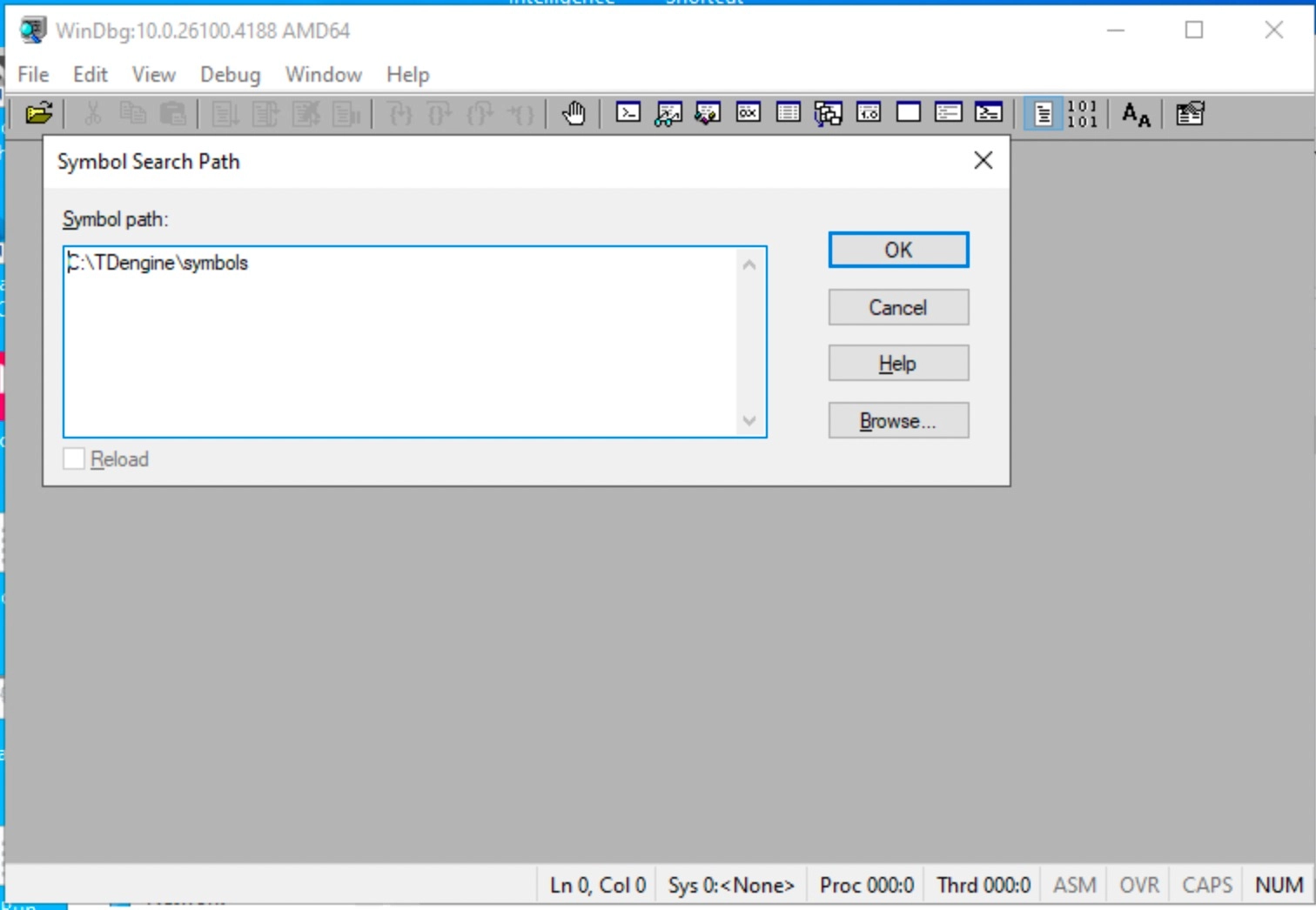
-
分析 dmp 选择菜单 File -> Open Crash Dump,弹出窗口中选择 dmp 文件,打开所要分析的 dmp 文件进行分析。
dmp 文件打开后,在底部命令行输入
k命令显示崩溃栈,成功加载 PDB 时可以看到函数名及源码文件名和行号信息,如下: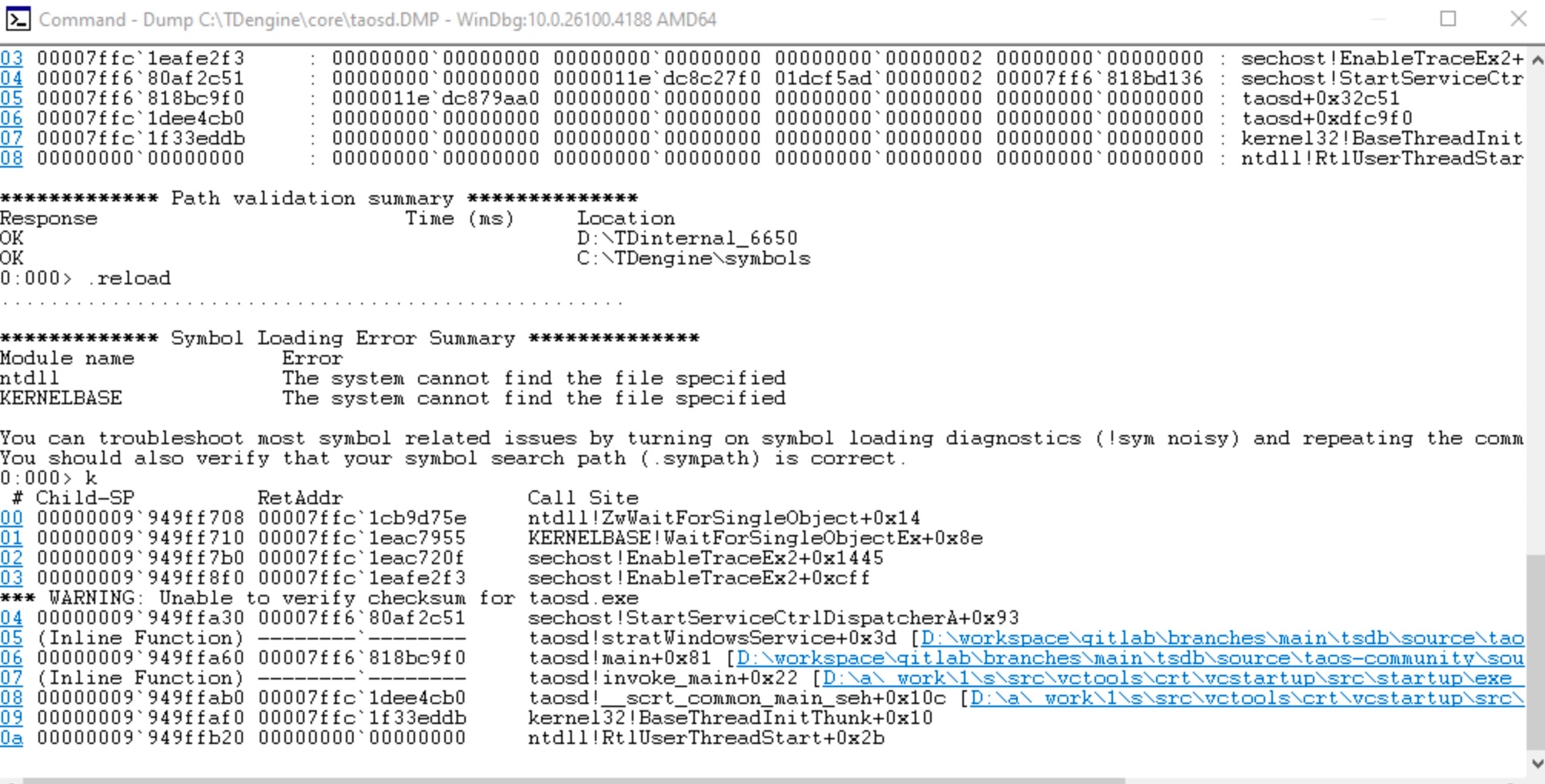
此时调用 WinDbg 工具提供的命令行,详细分析崩溃原因。
使用 ASAN 版本
若通过 dmp 仍然无法找到问题,可进一步升级分析方法,使用带内存越界访问监控的 ASan 版本继续定位问题。
目前 TDengine 仓库 Debug/Release 均支持编译 ASAN 版本,编译选项与 LINUX 相同。
说明: Windows 下的 ASAN 不支持内存泄露检查功能,但越界访问及 Use-after-free 都支持。
版本编译
- 编译选项:
-DBUILD_SANITIZER=true。 - DEBUG 版本:VS 2022 任意版本都可编译。
- RELEASE 版本:VS 2022 >= 17.14.32。
前置条件
在目标机器上运行 ASan 版本的 TDengine,需要把编译机上的 ASan 动态库复制到用户机器上。
动态库在编译机上位置(VS 2022):
C:\Program Files\Microsoft Visual Studio\2022\Community\VC\Tools\MSVC\14.44.35207\bin\Hostx64\x64\
| 构建类型 | 需随包的 DLL | 复制目标位置 |
|---|---|---|
| Release + ASan | clang_rt.asan_dynamic-x86_64.dll | 放到 taosd 同目录下 |
| Debug + ASan | clang_rt.asan_dbg_dynamic-x86_64.dll | 放到 taosd 同目录下 |
MSVC ASan 报告输出位置
默认输出:stderr
ASan 报告默认写到 stderr。具体去哪取决于运行方式:
| 运行方式 | 默认输出位置 |
|---|---|
| 命令行直接运行 taosd.exe | 直接打印到当前终端窗口 |
| 双击运行(无控制台) | 丢失(无窗口,stderr 无处输出) |
| 作为 Windows 服务运行 | 丢失(服务无 stderr 控制台) |
把 ASan 报告输出到文件(避免丢失)
设置环境变量 ASAN_OPTIONS,在启动 taosd 之前:
# 加上进程名,便于区分多进程场景
set ASAN_OPTIONS=log_path=C:\TDengine\log\asan_report:log_exe_name=1
taosd.exe
生成文件名格式:asan_report.12345(PID 后缀)或 axsan_report.taosd.exe.12345。
性能对比
taosBenchmark 创建 1W 子表,每子表 1W 的智能电表数据
说明: DEBUG 版本大量写入数据会崩溃(已知编译的问题),暂无法测试
| 写入性能 | 对比 | |
|---|---|---|
| Release 版本 | 204 秒 | 基准 |
| Release + ASan 版本 | 324 秒 | 增加 50% |
ASan 检测效果图
测试代码段:
void test() {
    char buf[4];
    // overflow
    memcpy(buf, "abcdefg01234", 8);
}
检测结论:
ASan 成功检测到越界访问,报告如下:
=================================================================
==12345==ERROR: AddressSanitizer: stack-buffer-overflow on address 0x7ffde5c1f8f0 at pc 0x0000000000000 bp 0x7ffde5c1f8a0 sp 0x7ffde5c1f890
READ of size 8 at 0x7ffde5c1f8f0 thread T0
    #0 0x000000000000 in test() (taosd.exe+0x000000000000)
    #1 0x000000000000 in main (taosd.exe+0x000000000000)
Address 0x7ffde5c1f8f0 is located in stack of thread T0 at offset 48 in frame
    #0 0x000000000000 in test() (taosd.exe+0x000000000000)
  This frame has 1 object(s):
    [32, 36) 'buf' <== Memory access at offset 48 overflows this variable
HINT: this may be a false positive if your program uses some custom stack unwind mechanism or swapcontext
      (longjmp and C++ exceptions *are* supported)
SUMMARY: AddressSanitizer: stack-buffer-overflow in test() (taosd.exe+0x000000000000)
服务崩溃跟踪
TDengine TSDB 服务进程 taosd.exe 遇到崩溃后会退出,Windows 系统检测到服务退出,会尝试重新启动服务,为避免反复启动崩溃,只启动三次,启动日志可在 控制面板->Windows 事件查看器 中找到,另外服务被停止日志也记录在此。
总结
如果有 DMP 文件优先分析 DMP 文件定位原因,仍然无法定位后上 ASAN 版本查找问题。